Free Self-Hosted WhatsApp API, CRM Dashboard & AI Autoreply Bot (Open Source)
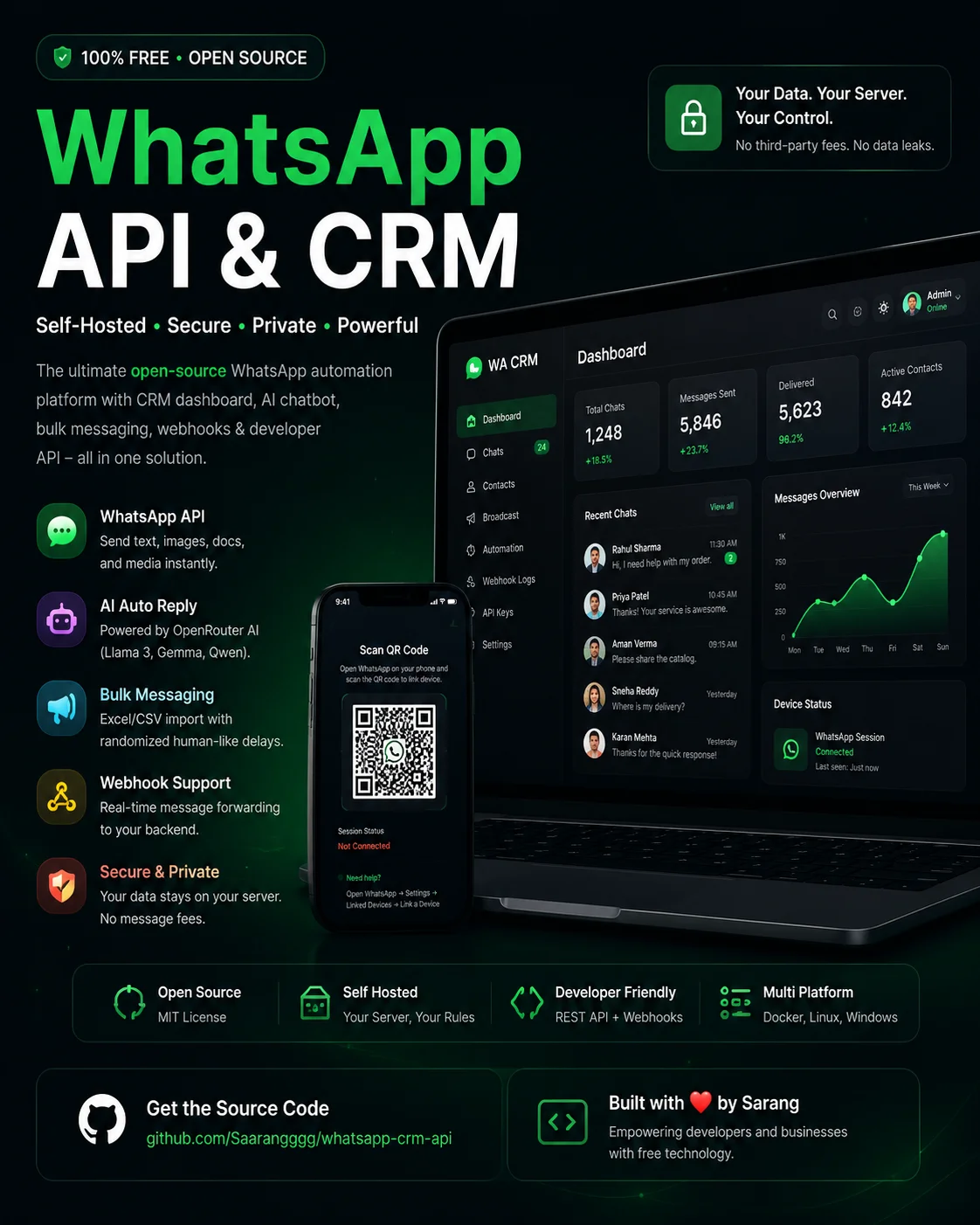
Build Your Own Free WhatsApp API & CRM
If you've been searching for a completely free alternative to the WhatsApp Cloud API or expensive CRM platforms, this project is designed for you.
This open-source solution combines:
- WhatsApp API - Web CRM Dashboard - AI Autoreply Bot - Bulk Message Sender - REST API - Webhooks - OpenRouter AI Integration
Everything runs on your own server using whatsapp-web.js and Puppeteer, giving you full ownership of your data and unlimited messaging without per-message charges.
---
⭐ GitHub Repository
The complete source code for this project is available on GitHub.
Repository: https://github.com/Saarangggg/whatsapp-crm-api
If you find this project useful, please consider:
- ⭐ Starring the repository - 🍴 Forking it for your own projects - 🐛 Reporting bugs - 💡 Suggesting new features - 🤝 Contributing with pull requests
Contributions are always welcome under the MIT License.
Features
WhatsApp CRM Dashboard
Manage chats through a modern web interface.
- Real-time conversations - Contact management - Search - Message history - Login protection
---
Developer REST API
Simple endpoints allow your applications to send messages programmatically.
Supports:
- Text messages - Images - Documents - PDFs - Media attachments
Authentication is secured using your own secret key.
---
AI Auto Replies
Connect your OpenRouter API key and enable AI-powered customer support.
Supported models include:
- Meta Llama 3 - Google Gemma - Qwen
You can configure responses directly from the dashboard without writing code.
---
Bulk Message Broadcasting
Upload Excel or CSV files containing customer numbers.
Features include:
- Personalized placeholders - Randomized delays - Human-like sending intervals - Excel import - CSV support
---
Webhook Support
Every incoming message can automatically be forwarded to your backend.
Perfect for:
- CRM integration - Order systems - ERP software - Automation workflows
---
Privacy First
Unlike hosted WhatsApp services, your data stays on your own server.
That means:
- No third-party message storage - No monthly API fees - Full control of sessions - Self-hosted authentication
---
Deployment Options
You can deploy it on:
- Hugging Face Spaces - VPS - Docker - Ubuntu Server - Windows - Local Machine
Deployment only takes a few minutes.
---
Why Use This Project?
Compared to commercial WhatsApp APIs, this project offers:
- Unlimited messaging - Open source (MIT License) - AI automation - CRM dashboard - REST API - Bulk messaging - Webhooks - Complete ownership
There are no recurring platform fees.
---
Perfect For
- Startups - Developers - Agencies - Customer Support Teams - E-commerce Stores - Small Businesses - Automation Projects - Personal CRM
---
Getting Started
1. Clone the repository. 2. Configure your `.env` file. 3. Install dependencies. 4. Run the server. 5. Scan the QR code. 6. Start sending messages.
You can also deploy directly to Hugging Face Spaces using Docker.
---
Open Source License
This project is released under the MIT License and is completely free for personal and commercial use.
Contributions and feature improvements are always welcome.
---
Get the Source Code
Ready to deploy your own WhatsApp CRM?
👉 GitHub Repository: https://github.com/Saarangggg/whatsapp-crm-api
Clone it, customize it, and build your own AI-powered WhatsApp automation platform completely free.
If this project helped you, don't forget to ⭐ Star the repository and share it with other developers.
Final Thoughts
Build your own WhatsApp automation platform without paying recurring API fees. Whether you're a developer, startup, or business owner, this open-source project gives you complete control over messaging, AI automation, customer management, and integrations while keeping your data private.
Comments (0)
No comments yet. Be the first to share your thoughts!
No comments yet.
Be the first to share your thoughts!